
How To: Turn Water On or Off Remotely or Manually
There are several ways that you can turn your water on or off via the Moen Flo App or at user.meetflo.com. Follow the steps below to perform this function:
If your water was turned off from a Critical Alert ensure any issues related to the alert are resolved. Once you're confident that everything is secure, you can proceed to turn the water back on.
Turn Water On/Off Using the App
| Moen Flo App |
|---|
|
On your Flo Shutoff screen, tap the on/off toggle to turn the water on or off for your Moen Flo Shutoff.
|
|
If you need to select a different Flo Shutoff, open the menu and then select the device you would like to turn on or off.
|


Turn Water On Using in the App’s After a Critical Alert
If you receive a critical alert, you can open that alert and control your water from the alert.
If your water was turned off from a Critical Alert ensure any issues related to the alert are resolved. Once you're confident that everything is secure, you can proceed to turn the water back on.
| Moen Flo App | ||||
|---|---|---|---|---|
|
Open the Moen Flo app and tap on the Alerts menu at the bottom of the app. (note: you will not be able to turn your water on/off from a Warning or Information alert)
|
||||
|
Tap Turn Water On |


Turn Water On/Off Using user.meetflo.com
To turn your water on or off, log onto user.meetflo.com. On the home page, select the Moen Flo Shutoff device you would like to turn on or off. There is a toggle button for Water. Click on it to turn your water on or off.

Turn Water On/Off Manually
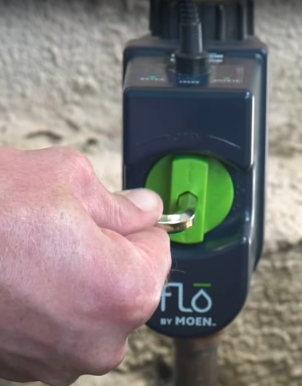
To turn your water on or off manually, go to your Moen Flo Shutoff, insert the hex key that came with your device, push in and turn in any direction until the valve light is solid green.
This article contains information relevant to the Moen Flo Shutoff, which was formerly known as the Flo Smart Water Monitor and Shutoff system.
This article contains information relevant to the Moen Flo App, which was formerly known as the Moen Smart Water Network app, Moen Smart Water app, Moen app, and Flo by Moen app.