
How To: Turn On/Off Weekly Report Emails for Flo Shutoff
This article will provide step by step instructions on how to turn on or off Flo Smart Home Monitor and Shutoff Weekly Report emails through user.meetflo.com.
The Weekly Report is an email that is sent to your email weekly to help you monitor your water consumption.
Turning on and off the Weekly Report can only be done in the User.meetflo.com user portal.
- Log into User.meetflo.com with your Flo by Moen account email and password.

If you have the Moen Smart Water app and are unsure of the email you used for your Flo by Moen account, please see Where Do I Find My Flo by Moen Account Email? article for how to find your Flo by Moen account email in the Moen Smart Water Network app.
- Click on Settings in the upper right corner and then click on User Profile in the drop-down menu.

- Click on Email Preferences.
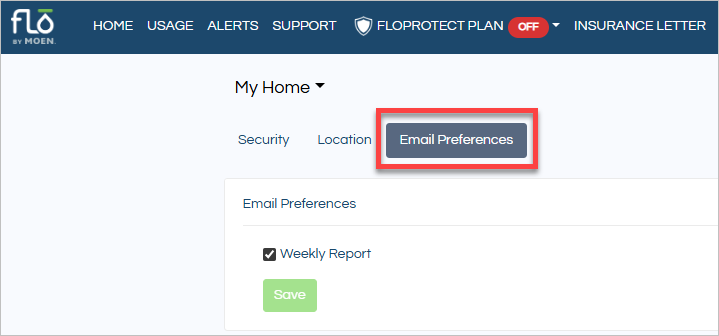
- Uncheck or check the box next to Weekly Report to turn off or on the Weekly Report sent to your email.

- Click on Save to save your change.
