
How To: Add a Manual Override
Quick summary: Manual Override lets customers schedule expected high-water-use events, such as irrigation or water softener cycles, so the Moen Flo shutoff can reduce nuisance alerts while still protecting the home when usage exceeds the customer’s selected limits.
Overview
Manual Override allows customers to create scheduled exceptions for recurring water activities that may otherwise trigger alerts or automatic shutoffs.
Use Manual Override when a water event happens on a predictable schedule, such as:
- Irrigation or sprinkler systems
- Water softener regeneration cycles
- Pool filling
- Walk-in tub fills
- Power washing
- Other planned high-water-use activities
During the scheduled time window, the Moen Flo shutoff uses the limits the customer defines instead of relying only on the home’s learned water usage patterns. This helps reduce nuisance alerts while maintaining protection against possible leaks.
When to Use Manual Override
Manual Override is best for recurring activities that use more water, run longer, or happen less frequently than normal household use.
- The customer receives recurring alerts for a known water activity.
- A scheduled appliance regularly triggers unusual activity alerts.
- Irrigation, pool equipment, or water treatment systems run on a schedule.
- A second home, rental home, or vacation home has inconsistent occupancy patterns.
Tip: Keep override schedules as narrow as practical so the home remains protected outside the expected usage window.

How to Add a Manual Override
1. Open the Moen Flo app.

2. Open the menu, then select the Moen Flo Shutoff device

3. Tap Settings at the top of the screen

4. Select Manual Override.

5. Tap Add Manual Override.

6. Configure the Manual Override
7. Save Changes

Configure the Override
Name the Override
Choose a clear name that describes the activity. Examples include Irrigation, Water Softener, Pool Fill, or Walk-in Tub.
Set the Schedule
Enter a start time and end time that covers the entire water event. For example, irrigation may run from 5:00 AM to 7:00 AM, while a water softener may regenerate from 2:00 AM to 4:00 AM.
Select the days the event is expected to occur. If the schedule varies, selecting all days is often the best option. The override only matters during the selected time window when water is actually flowing.
Set Alert Thresholds
Manual Override uses three thresholds to decide when an alert should still be generated during the scheduled window. The Alert Threshold limits let you set up thresholds for water events (from the moment a water activity starts flowing to the moment it ends). Flosense will send an alert if any of these parameters are exceeded during the manual override schedule.
Flow Rate Limit
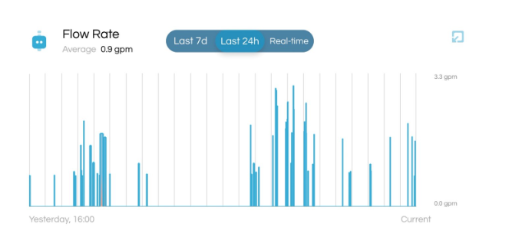
The Flow Rate Limit is the maximum water flow allowed during the event. Faucets typically use about 1 to 2 gallons per minute, showers may use about 2.5 to 5 gallons per minute, irrigation can use 5 to 25 or more gallons per minute, and water softeners typically remain under 10 gallons per minute.
If more than one fixture may run at the same time, set the Flow Rate Limit high enough to account for the combined water use.
Please note the Flow Rate Limit max is 25.0 gallons per minute (GPM). The GPM will not be able to be set higher than that.
Water Usage Limit
The Water Usage Limit is the total amount of water allowed during a single event. This value should be high enough to let the expected activity finish without triggering a nuisance alert.
Water Duration Limit
The Water Duration Limit is the maximum amount of time the event can run before generating an alert. This value is entered in seconds.
- 30 minutes = 1,800 seconds
- 1 hour = 3,600 seconds
- 2 hours = 7,200 seconds
Choose the Monitoring Mode
Select whether the Manual Override should apply during Home Mode, Away Mode, or both Home and Away Modes.
If irrigation, a water softener, or another scheduled activity may run while the customer is away from home, apply the override to both Home and Away Modes.
Shutoff After an Alert
Customers can choose whether the system automatically shuts off water if one of the Manual Override thresholds is exceeded.
Recommended setting: Keep automatic shutoff enabled whenever possible. This allows the system to continue protecting the home if water usage exceeds the selected limits.
If automatic shutoff is disabled, the customer may still receive an alert when a threshold is reached, but the valve will not automatically close during that override window.
Tips for Choosing Threshold Values
If the customer is unsure what values to enter, use Sleep Mode while the activity runs normally. After the activity finishes, review the water usage details in the Moen Flo app and use that information to set more accurate Manual Override thresholds.
This approach works especially well for irrigation systems, water softeners, pool filling, and other scheduled high-water-use events.
Best practice: Set threshold values slightly above normal observed usage, but avoid setting them much higher than needed. This helps reduce nuisance alerts without masking possible leaks.
Troubleshooting
I still receive alerts during my Manual Override
- Increase the Flow Rate Limit if the activity uses more gallons per minute than expected.
- Increase the Water Usage Limit if the event uses more total water than expected.
- Increase the Water Duration Limit if the event runs longer than expected.
- Confirm the scheduled time window covers the full water event.
My water softener still causes shutoffs
- The regeneration cycle may be using more water than expected.
- The cycle may be running longer than expected.
- The cycle may be operating outside the scheduled override window.
- Create a wider time window and adjust the thresholds to match the actual regeneration cycle.
My irrigation system triggers alerts even with a Manual Override
- Multiple irrigation zones may be running at the same time.
- Indoor fixtures may be used while irrigation is active.
- The Flow Rate Limit may be too low.
- Increase the Flow Rate Limit to account for total water use during the irrigation cycle.
I have multiple Manual Overrides that overlap
- When overrides overlap, the override higher in the list takes priority.
- Place the override with the highest thresholds at the top of the list.
My Manual Override is not running
- Confirm the correct days are selected.
- Verify the start and end times are correct.
- Make sure the override was saved successfully.
- Confirm water is turned on during the scheduled window.
Frequently Asked Questions
What is the difference between Manual Override and Sleep Mode?
Manual Override is designed for recurring water events and follows a schedule using custom thresholds. Sleep Mode is best for temporary or one-time situations when the customer expects unusual water use and wants to prevent alerts or shutoffs for a limited time. Sleep Mode can be enabled for up to 72 hours.
Can I use Manual Override for a vacation home or rental property?
Yes. Manual Override can be helpful for homes with irregular occupancy patterns where water usage may not happen consistently enough for the system to learn.
Can I temporarily disable a Manual Override?
No. Manual Overrides cannot be turned off without deleting them. If the customer no longer needs an override, they can remove it and recreate it later if needed.
Can I create separate overrides for Home and Away Modes?
Yes. Customers can create different Manual Overrides and apply them to Home Mode, Away Mode, or both.
What can override a Manual Override?
Sleep Mode and automatic shutoff events triggered by a connected Moen Leak Detector can take priority over a Manual Override.
Can the system still shut off water during a Manual Override?
Yes. If water usage exceeds the thresholds configured by the customer and automatic shutoff is enabled, the system can still send alerts and shut off water to help protect the home.
How do I know what limits to choose?
Use Sleep Mode for one full water event to observe the actual flow rate, total water use, and duration. Then create or update the Manual Override using values slightly above the observed usage.
Should I select all days for irrigation or water softener cycles?
If the schedule varies, selecting all days can help cover unexpected run days. The override only applies during the selected time window.
This article contains information relevant to the Moen Flo Shutoff, which was formerly known as the Flo Smart Water Monitor and Shutoff system.
This article contains information relevant to the Moen Flo App, which was formerly known as the Moen Smart Water Network app, Moen Smart Water app, Moen app, and Flo by Moen app.