
Unusual Activity
Unusual Activity is a generic alert triggered by a combination of duration, total volume, flow rate, and time of week, without either one being a dominant factor. FloSense Technology has determined that this activity is seen outside of what Flo has considered normal.
The Alert Variations that can be seen in the App are:
- Unusual Activity
- Unusual Activity at This Time of Day
- Unusual Activity at This Time of Week
Troubleshooting
Water Was Not Shut off due to alert resolving or you selected “Keep Water Running”
Solution: If you determined this alert is not a leak, you know the source of the alert, and you do not want to continue receiving this alert, you can lower the sensitivity in the App to allow the device to run longer before an alert triggers.
View Based on App:
| Moen Flo App |
|---|
|
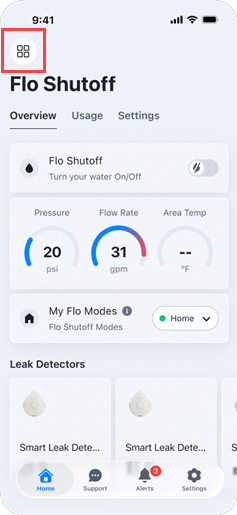
1. Open the menu, then select the Moen Flo Shutoff device you want to change the Shutoff Sensitivity for.
|
|
2. From your Moen Flo Shutoff device, tap on the Settings tab at the top of the screen to open the device settings.  |
|
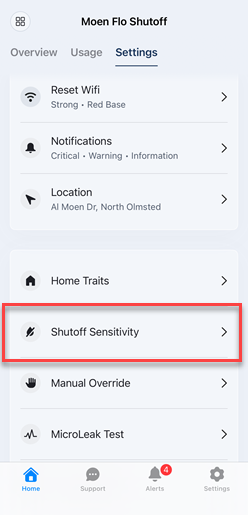
3. Scroll down and tap on Shutoff Sensitivity.
|
|
4. Adjust the Shutoff Sensitivity to receive less or more alerts. Decrease the sensitivity to receive less alerts or increase it for added protection.
This means you are telling Flo that the minimum threshold to alert you can be widened, thus sending you less alerts. |


Water was shut off:
FloSense will not learn this event because the water was shut off before the event could be completed. If it is determined the water shutoff was not a leak, take one of the following actions (listed in order of preference), depending on what is most convenient for you.
|
Action |
Details |
Steps |
|---|---|---|
|
Select Keep Water Running (next time) |
Next time the alert occurs: If it is determined the water shutoff is not a leak and you know the source, select “Keep Water Running” in the app next time this type of event occurs. This will prevent the shutoff from occurring and FloSense will be able to retrain with the entire event. |
|
|
Set the sensitivity slider to a lower setting |
The alert might be avoided by setting the Alert/Shutoff Sensitivity to a lower setting. Moen Flo App: Selecting Standard means the Moen Flo Shutoff will only shut off water if there's a major, highly unusual water event and you will receive less alerts. Selecting Maximum means you will receive more more alerts and the device will only shut off your water at the first sign of abnormal activity, no matter how minor. |
See Water Was Not Shut off above in this article for step by step instructions on how to adjust the sensitivity. |
|
Put the device in Sleep Mode (if it is a repeatable) |
If the event is easily repeatable and predictable, you can put the device in Sleep Mode prior to the event reoccurring so that FloSense will be able to learn about the entire event next time. NOTE: While the device is in Sleep Mode there will be no alerts and shutoffs. The device will not be protecting the home during this time. |
Go to user.meetflo.com. At the top of the page, you can select Sleep mode.
OR Go into the Moen Flo App and select Sleep Mode |
|
Setup a Manual Override (if the event occurs on a known schedule) |
If the event occurs on a known schedule, then setup a Manual Override so that the alarms and shutoff will be disabled during that time while FloSense continues to learn these events.
|

Additional Troubleshooting:
| Scenario | Solution |
|---|---|
|
A new product was installed on the water line after the Moen Flo Shutoff and is causing an Unusual Activity alert |
Add a Manual Override for this event. See the article on Manual Override |
|
Alert shows a large amount of water usage, but you are unable to find the source. |
|
This article contains information relevant to the Moen Flo Shutoff, which was formerly known as the Flo Smart Water Monitor and Shutoff system.
This article contains information relevant to the Moen Flo App, which was formerly known as the Moen Smart Water Network app, Moen Smart Water app, Moen app, and Flo by Moen app.