Moen Solutions

Piston/Handle Installation

This article explains how to replace the Handle Assembly on a Moen Commercial M-Dura Manual Flush Valve. It outlines the necessary tools, the steps for removing the original Handle Assembly, and how to prepare and install the new Handle Assembly. 

Preparation:

Recommended Tools: flat head screwdriver and adjustable wrench 

How to Replace Handle Assembly:

Snag_dff32d.png

  1. Using a flat head screw driver, turn off the water supply at the Elbow (A). 

Snag_fe586d.png

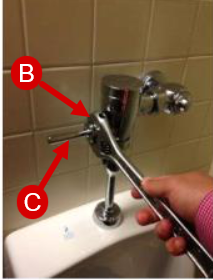
  1. Loosen the Bearing Nut (B) with an adjustable wrench.
  2. Gently pull the Lever Handle (C) to remove the Handle Assembly.

Snag_ed5487.png

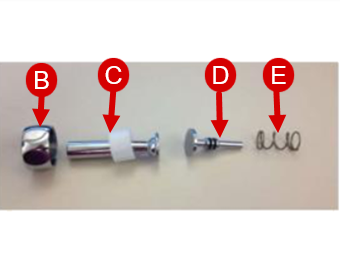
  1. Apply the included lubrication to the O-rings and surface of the Lever Pin (D) included in the replacement Handle Assembly. 

Snag_fbb05f.png

  1. Assemble the replacement Handle Assembly in this order: Bearing Nut (B), Lever Handle (C), Lever Pin (D), and Spring (E)

Snag_100f58e.png

  1. Insert the Spring (E) end of the Handle Assembly into the Flush Valve. 
  2. Tighten the Bearing Nut (B) with an adjustable wrench. 

Snag_dff32d.png

  1. Using a flat head screw driver, turn on the water supply at the Elbow (A). 
 

Still Not Finding What You're Looking For?

Contact Us or Call 1-877-MOEN-PRO (1-877-663-6776)

Hours: Monday to Friday 8am to 7pm EST

To explore durable solutions built for real-world use visit MOEN-Commercial.com Your brand for reliable performance you can trust.

  • Was this article helpful?