
How to Manually Run a MicroLeak Test
Your Moen Flo Shutoff automatically runs an automatic MicroLeak Test nightly. However, there may be times that you want to manually initiate a MicroLeak Test. Follow the steps below to Manually Run a MicroLeak Test in either the App or at user.meetflo.com.
Manually Run a MicroLeak Test from the App
Moen Flo App |
|---|
|
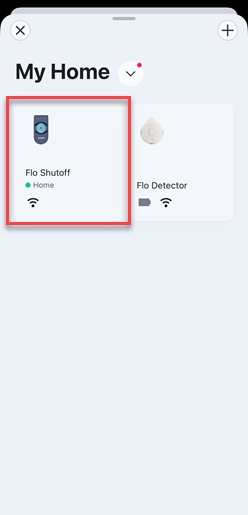
1. Open the menu, then select the Moen Flo Shutoff device for the Manual MicroLeak Test.
|
|
2. Scroll down to the bottom of the device's home page and locate the MicroLeak Test section. Tap Run MicroLeak Test.
|
|
3. Tap Start to confirm and run the MicroLeak Test.
|



Manually Run a MicroLeak Test from user.meetflo.com
Log onto user.meetflo.com with your Flo by Moen email and password. Select Manual Health Test.
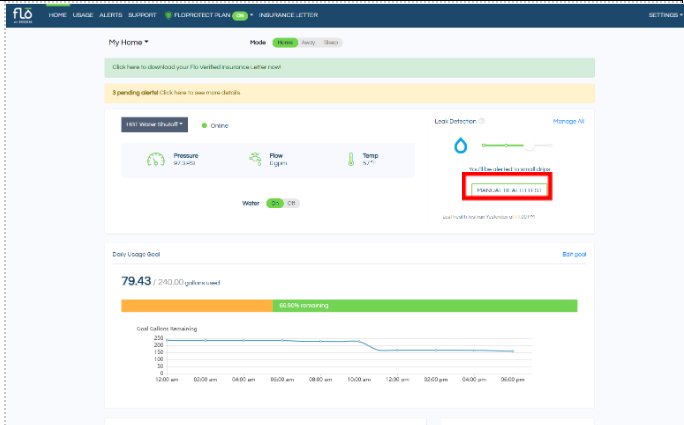
A pop up window will appear, select Yes.

This article contains information relevant to the Moen Flo Shutoff, which was formerly known as the Flo Smart Water Monitor and Shutoff system.
This article contains information relevant to the Moen Flo App, which was formerly known as the Moen Smart Water Network app, Moen Smart Water app, Moen app, and Flo by Moen app.