
How To: View Water Flow Data in the App
In the App, you can view the following data on your home’s water flow:
- Activity Log History
- Real Time: Flow Rate, Pressure and Temperature
- Trends: Flow Rate, Pressure and Temperature
View Flow Rate, Pressure and Temperature (current & trends) in the App
Please note, most users are on the Moen Smart Water Network App. The Flo by Moen App is being sunsetted. Moen will contact current users when it is their time to convert to the Moen Smart Water Network App.
|
Moen Smart Water Network App |
Flo by Moen App |
|---|---|
|
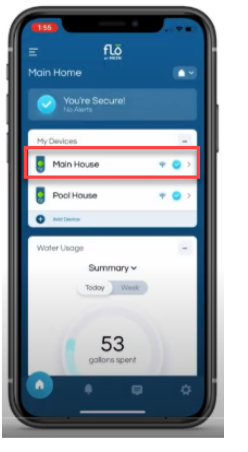
Open your App and from the Home Screen, tap on the device you want to view water flow data for.
You can also select the device by tapping on the device (faucet) icon at the bottom of the screen.
|
Open your App and from the Home Screen, tap on the device you want to view water flow data for. |
|
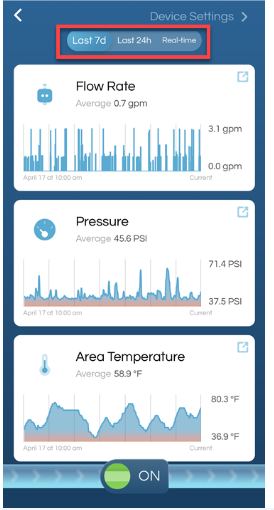
From the Flo Shutoff device page, you can view Flo Rate, Pressure and Temperature if you scroll down on the page. The app defaults to Last 7d (Last 7 days).
|
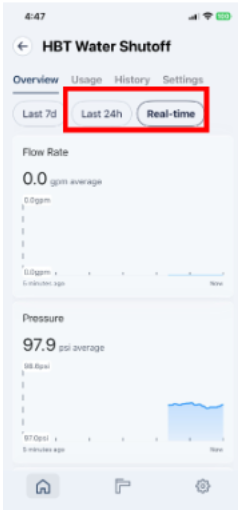
From the Flo Shutoff device page, you can view live Pressure, Flow Rate and Area Temperature.
Scroll down the page to view historical information for Pressure, Flo Rate, and Area Temperature.
|
|
To change the data range view, tap on Last 24h (Last 24 hours) or Real-time. This will change the view for Flow, Pressure, and Area Temperature.
|
To change the data range view, tap on Last 7d, Last 24h, or Real-time. This will change the data range for Flow, Pressure and Area Temperature.
|




View Water Usage in the App
|
Moen Smart Water Network App |
Flo by Moen App |
|---|---|
|
From the Flo Shutoff device screen, tap on the Usage tab.
|
From the Home Screen, scroll down to view Water Usage. |
|
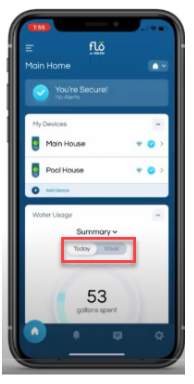
For Water Usage, you can change the view to either Today or Week. Under Water Usage you can also view how many gallons are remaining for your daily Water Consumption Goal and the gallons spent this month.
|
For Water Usage, you can change the view to either Today or Week. Under Water Usage you can also view how many gallons are remaining for your daily Water Consumption Goal and the gallons spent this month.
|



View Usage by Fixture at user.meetflo.com
|
Log into user.meetflo.com with your Flo by Moen email and password. Unable to find your Flo by Moen email and password? See Where Do I Find My Flo by Moen Account Email |
|
Tap on Home tab at the top of the page. |
|
Scroll down to Usage by Fixtures. |